Everything in the box

Every job management feature, on every plan

No add-ons, no per-tier gates, no "upgrade to unlock forms". Fifteen colour themes so it wears your company colours, help and support built into the app, and everything below on every plan. See what the plans cost →

🗓 Scheduling & jobs

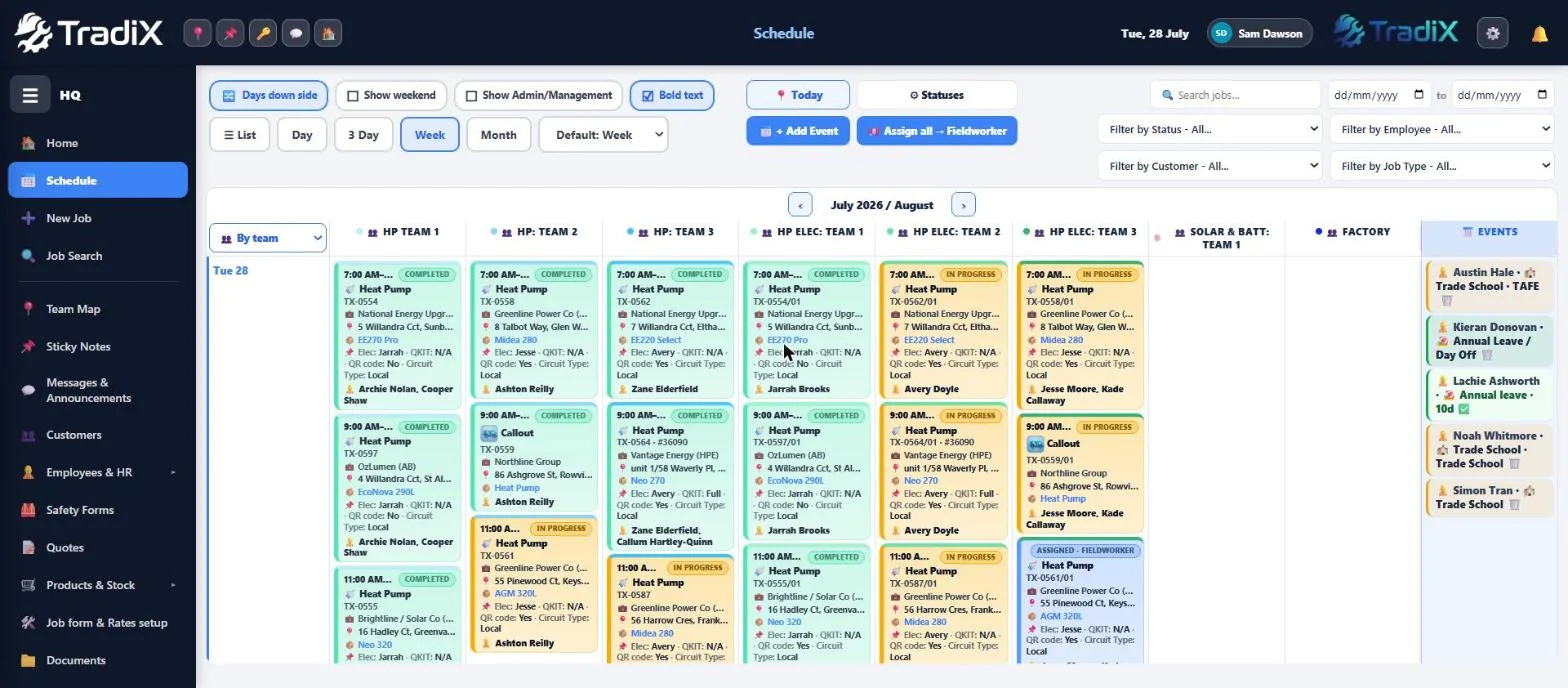
  • Drag-and-drop scheduling — jobs sit on a real time ruler; drag them between days and crew members, stretch a pill's edge to change the end time
  • Four board views — Today, 3-Day, Week and Month, with a live now-line and your default view saved per login
  • Mobile schedule — on the phone it's a clean day-by-day agenda, one line per job, colour-coded by status
  • Your statuses, your colours — rename stages, pick colours, pin the ones that stick (Completed, Invoiced, Certs Sent)
  • Job types, your way — rename the built-ins, pick their emoji, hide the ones you don't use
  • Un-assigned band & events — park jobs on the board before they have a worker; leave and events sit alongside
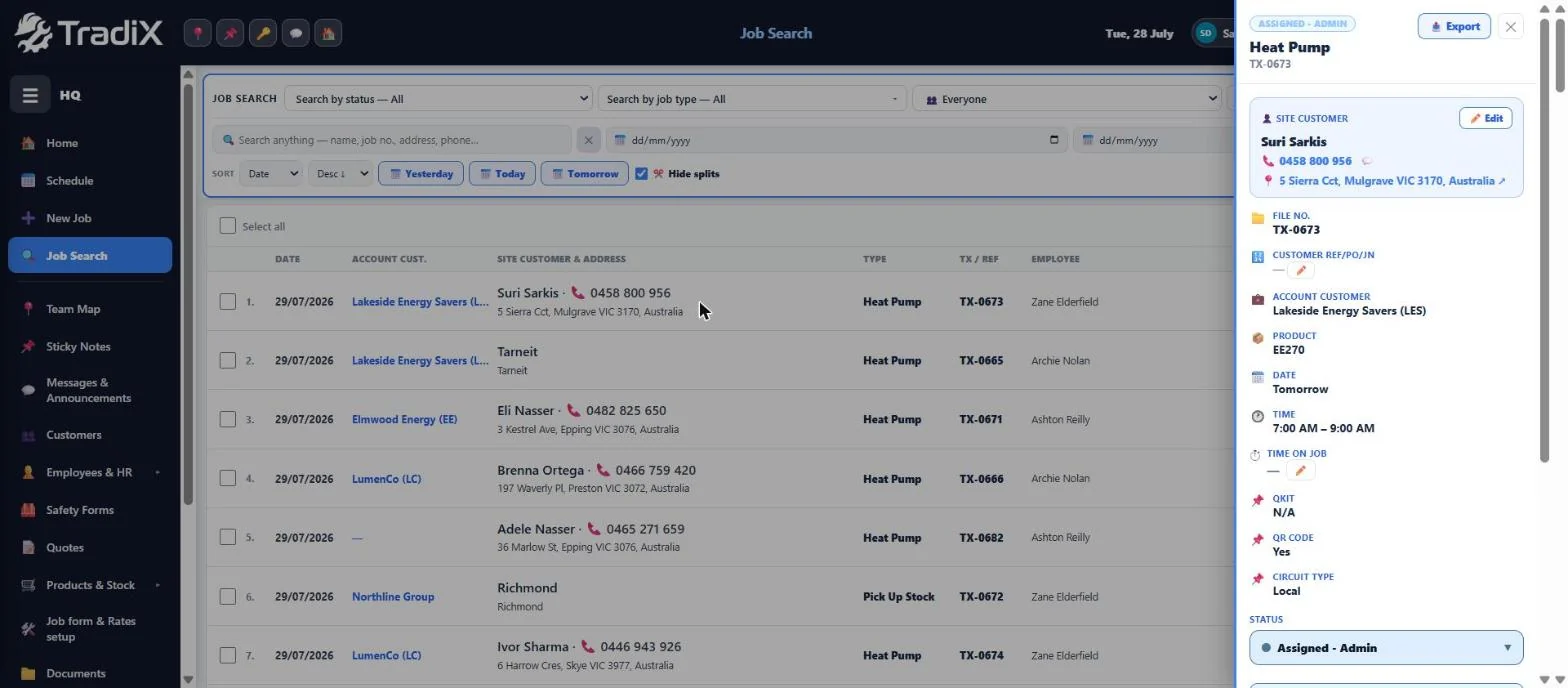
  • Job Search — every job ever, filtered by status, type, employee, customer and date, with running totals, bulk status changes and exports
  • Jobs, quotes & projects — search and switch between all three in the one place
  • Teams & splits — assign a whole team in one hit, and ✂️ split a job into a linked visit when it outgrows the day
  • Deleted isn't gone — jobs land in a Trash you can restore from, not a void
  • Quick fields — pin the gate code, key location or the dog's name to any job card
  • Quotes → jobs — quote from the same rates your forms use, convert to a job in one tap
  • Live site weather — right on the worker's home screen, pulled automatically, no setup
  • Callouts to projects — twenty-minute service calls and multi-day installs live on the same board, statuses and all
  • Completed isn't locked — reopen a finished job when the site calls back, history intact
  • Repeating jobs — tick Repeat when you create it and the job comes back on schedule

📋 Job forms & pricing

  • Build your own forms — yes/no checks, quantities, photo prompts, item lists, before/after shots and sign-offs, drag-and-drop
  • Serial scans on forms — scan a unit's barcode or serial straight into the job record
  • A rate on every answer — each Yes carries a price, so the variations total builds itself on site
  • Per-customer pricing — price per account customer, and a job carries both the account (who pays) and the site customer (who answers the door)
  • Built-in trade forms — start from ready-made forms and tweak, instead of starting blank
  • SWMS & JSAs the same way — build the safety form once; the crew signs on site, every signed copy lands in a register, and you can require signing before a job can be submitted
  • Rates the office controls — put a cost on the job, inc or ex GST, and choose whether the crew sees the money
  • Live labour costing — time on job ticks from the crew's clock-ins, and the estimated labour cost builds at your hourly rate as they work
  • Make the form mandatory — tick one box and the crew can't mark a job Complete until the form is done
  • Progress that's honest — item counts, completion %, and photos attached to the answers they belong to

⏱ Timesheets & time

  • Three time modes — daily clock in/out, per-job start/stop for exact job time, or both together
  • Clock-ins with locations — every shift stores where it started and ended, one tap to the map
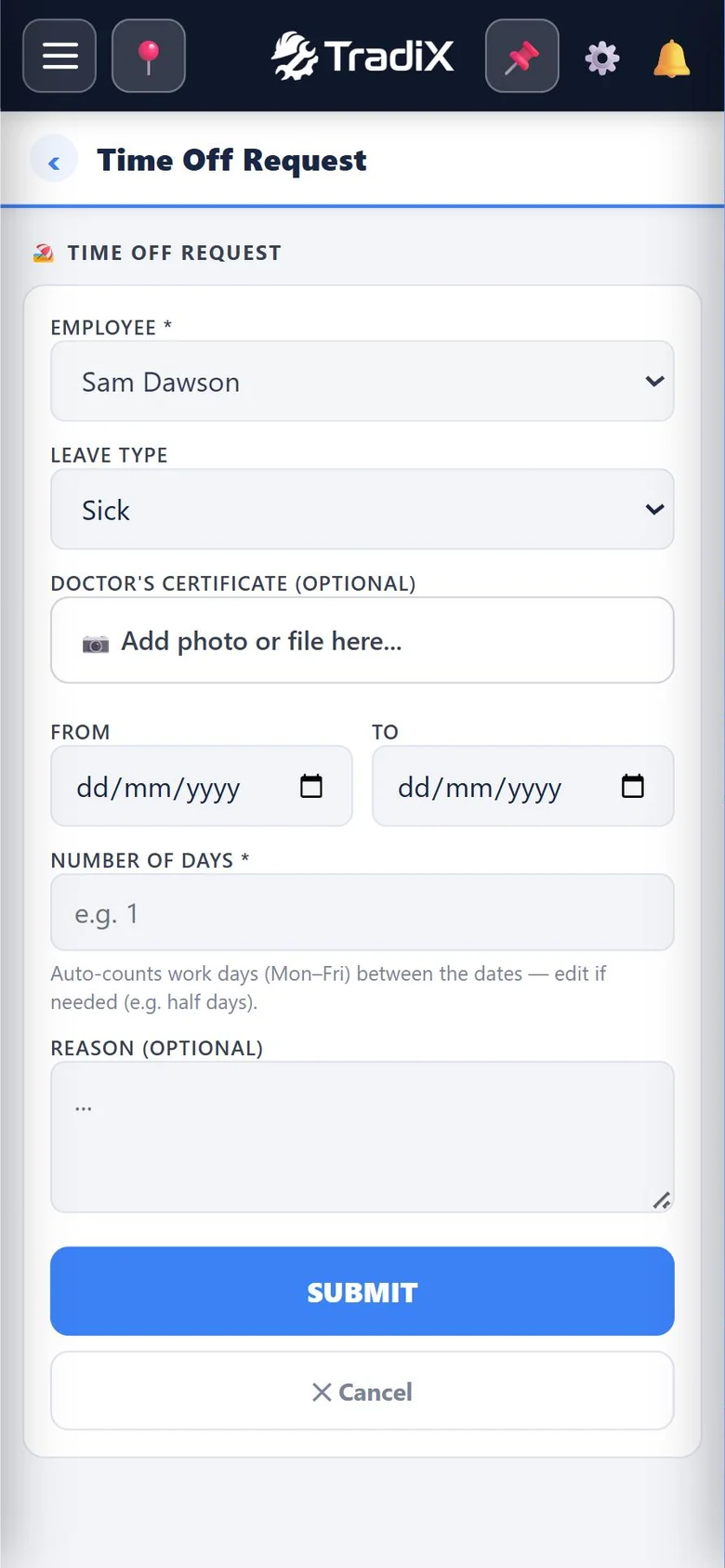
  • Leave balances — annual and sick leave tracking you can switch on per organisation
  • Permissions that matter — choose whether field staff can edit their own shifts, or view only
  • Payroll-ready exports — tick the shifts, out come PDF or CSV

🧰 Stock, POs & fleet

  • Stock items & suppliers — categories, costs and units, live stock value by category, with stocktakes in the same place
  • Order requests → POs — the crew requests from the field, the office rolls it into a purchase order, receiving updates stock
  • Products deduct from stock — pick the unit on the job, set the quantity, and the on-hand count updates itself
  • Vehicles, trailers & assets — rego expiry warnings before they bite, insurer & policy per vehicle, values and totals across the fleet
  • Insurance & compliance vault — upload policies with expiry dates; TradiX reminds you 1 month, 1 week and the day before each one lapses — in the bell, on Home, and as a push on admin phones each morning
  • Finance tracking — outstanding balance, monthly repayments and a payoff projection per vehicle

💬 Customer comms

  • One-tap navigate & on-my-way SMS — tap the address to open Google Maps or Waze; the customer gets a text from the business with a live travel-time ETA
  • Google-review QR on completion — hit Complete and the app shows a scannable QR built from your Google Business review link, ready for the customer to scan on the spot
  • Every SMS logged — messages sit against the job, not lost on someone's personal phone
  • Your licences on every export — plumbing and electrical registration numbers automatically on job PDFs and emails
  • Push announcements — one message from the office lands on every crew phone
  • Documents on the job — photos, files and sub-folders per job with folder-level visibility (all staff or managers only); iPhone HEIC photos just work

👷 Crew, requests & HR

  • The worker menu — materials lists, cash reimbursements, incident reports (straight into an admin register), time off and uniform requests, all flowing to one office feed
  • Text the app to a new starter — one tap sends the login link and install steps by SMS
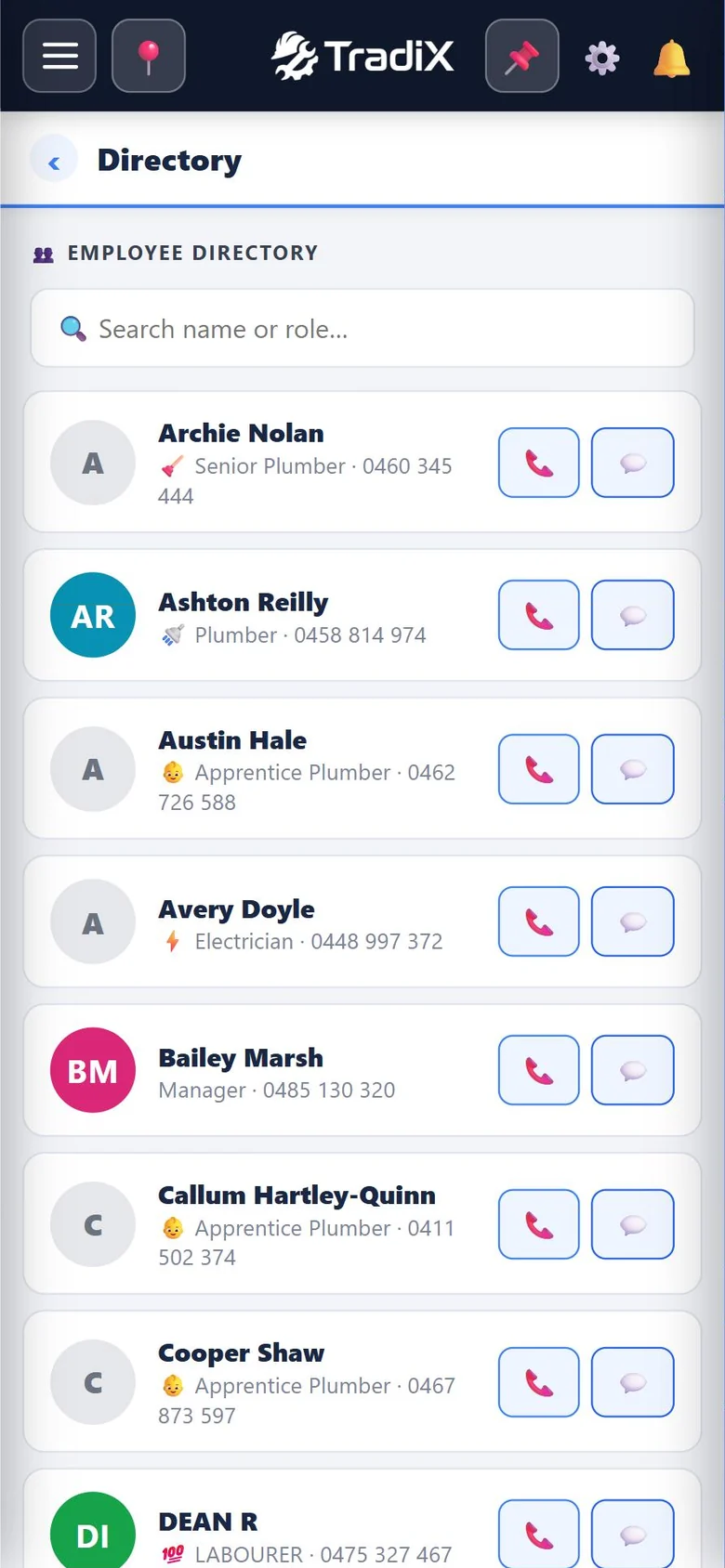
  • Employee directory & files — contacts, licences and documents per person, with licence-expiry reminders
  • Payroll-ready files — TFN, bank and super details on each employee, kept admin-only
  • Secure info vault — gate codes, alarm PINs and site logins per person, visible to managers only
  • Roles that fit a crew — admin, manager and worker views out of the box, plus your own trade-role chips (senior sparky to apprentice) driving the schedule filters, and a supervisor on any job
  • View-as — see the app exactly as any worker sees it before you roll something out
  • Sticky notes — a pinboard for the stuff that isn't a job yet — checklists, photos and colours, assigned to a name or the whole office, with a phone notification so it isn't missed
Why we built it

Too basic, or too complicated.
Nothing sat in the middle.

We tried the lot. Every app was either missing half of what a real crew needs, or so heavy you'd need a full-time admin just to run it. So we built the one in between.

The simple apps
  • Features locked behind higher tiers
  • No SWMS or safety sign-offs
  • No asset, rego or insurance register
  • Job costing costs extra — if it exists
  • You outgrow it in a year
The big systems
  • Quote-only pricing, thousands to implement
  • Three to five year lock-in contracts
  • Weeks of training before anyone's productive
  • Built for enterprise, not a crew of eight
  • Needs someone in the office to run it
TradiX
  • Everything included — no tiers, no upgrade walls
  • SWMS & JSA sign-offs built in, not bolted on
  • Vehicle, rego & insurance register with reminders
  • Live job costing off the crew's real clock-ins
  • Set up in a day — the crew just opens it and works
Built by a Melbourne plumbing & electrical crew — because nobody else built what we actually needed.